Podcast editing splits into two worlds now: classic audio editors for shows that live in podcast apps, and video-first editors for shows that also go to YouTube and Shorts. Most podcasters want to cut mistakes fast, clean up the sound, and turn the best moments into clips. Here are the podcast editors worth trying in 2026, what each is genuinely good at, and the honest trade-offs, starting with the one we build.
Last updated 2026-10-17. We build one of the tools on this list (PandaStudio) and have kept every other entry honest: real strengths, real limitations.
What to look for in podcast editing software
Audio only, or video too? Video podcasts need an editor that handles cameras, layouts and clips.
Can you edit by transcript, or do you scrub waveforms?
How good is the built-in audio clean-up (noise, echo, levels)?
Free, one-time or subscription, and does it record remote guests too?
The 8 best podcast editing tools at a glance
Tool
Best for
Pricing
PandaStudio(us)
Audio-only and video podcasts, from remote recording to clips, on your own computer
10 free exports, then $19/mo or a one-time license from $99
Descript
Editing podcast audio and video by editing text
Subscription (media minutes + AI credits)
Riverside
Recording multiple remote guests and editing in one place
14-day trial, no free plan; Pro $29/mo or $24/mo billed annually
Audacity
Free audio editing for any budget
Free & open-source
GarageBand
Free podcast editing on a Mac
Free
Adobe Audition
Professional audio clean-up and mixing
Subscription
Reaper
A powerful, affordable audio workstation
Paid license (discounted for individuals)
Hindenburg
Spoken-word audio made simple
Subscription or license (check current plans)
1.PandaStudio
macOS, Windows
Best for: Audio-only and video podcasts, from remote recording to clips, on your own computer
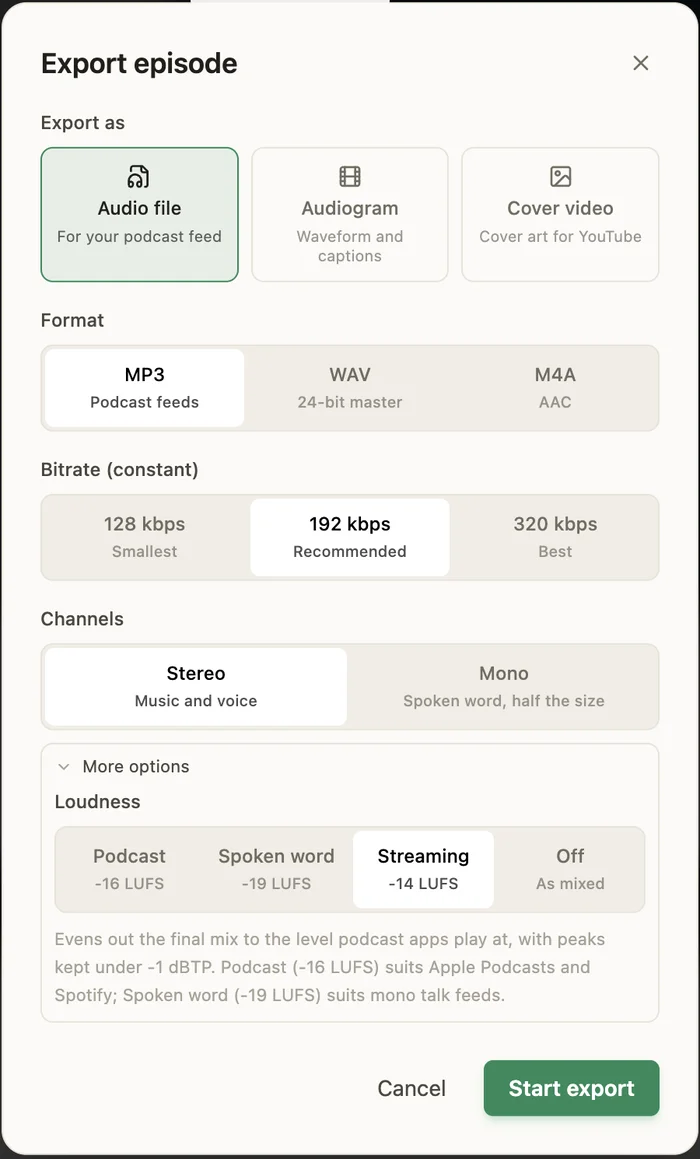
PandaStudio edits audio-only episodes (open MP3, WAV or M4A, several files become separate speakers) and video podcasts by transcript: remove filler words and pauses, apply Enhance voice per speaker, switch camera layouts or Follow the speaker, and turn the best moments into captioned Shorts. Export MP3, WAV or M4A at podcast loudness with tags and cover art, or an audiogram. It also records a host and up to 3 remote guests by browser link, each recorded locally. An AI agent can do the edit.
Exporting an audio-only episode: format, bitrate, channels and loudness target.
Pricing
10 free exports, then $19/mo or a one-time license from $99
Watch out
It isn't a multitrack audio workstation with plugin chains and routing; for detailed mixing use Audition or Reaper. Remote recording tops out at 3 guests.
Best for: Editing podcast audio and video by editing text
Descript transcribes each speaker and lets you edit the episode like a document, with Studio Sound, filler removal and remote recording (it absorbed SquadCast).
Pricing
Subscription (media minutes + AI credits)
Watch out
AI features use monthly credits, and big projects can feel slow.
Audacity is free, open-source and runs everywhere, with multitrack editing, noise reduction, compression and a large plugin ecosystem. It's where most audio podcasters start.
Pricing
Free & open-source
Watch out
It's audio only, edits are waveform-based, and effects are applied rather than easily tweaked later.
5.GarageBand
macOS, iOS
Best for: Free podcast editing on a Mac
GarageBand is free on Macs and handles multitrack recording, music beds and basic clean-up, a comfortable first podcast studio for Apple users.
Pricing
Free
Watch out
Mac and iOS only, audio only, and limited spoken-word tools.
6.Adobe Audition
macOS, Windows
Best for: Professional audio clean-up and mixing
Audition offers pro-grade spectral repair, noise reduction, loudness matching and multitrack mixing, and fits with Premiere Pro for video.
Pricing
Subscription
Watch out
It's a subscription with a learning curve, and it's audio only.
7.Reaper
macOS, Windows, Linux
Best for: A powerful, affordable audio workstation
Reaper is a full digital audio workstation with a generous evaluation period and an inexpensive license, loved by audio-savvy podcasters for speed and customisation.
Pricing
Paid license (discounted for individuals)
Watch out
It's built for audio engineers, so there's a real learning curve and no transcript editing.
8.Hindenburg
macOS, Windows
Best for: Spoken-word audio made simple
Hindenburg is designed for radio and podcast producers, with automatic levelling and loudness targets for spoken word.
Pricing
Subscription or license (check current plans)
Watch out
It's audio only and smaller in ecosystem than Audition or Reaper.
We compared tools on what podcasters actually do: recording (including remote guests), cutting by transcript or waveform, removing fillers and silences, noise and echo clean-up, multitrack mixing, video layouts, making clips, publishing, pricing model and platforms. Each pick names who it's best for and one honest limitation. Check current plans on each vendor's site.
Frequently asked questions
What is the best free podcast editing software?
Audacity on any computer and GarageBand on a Mac are the best free audio editors. For video podcasts, PandaStudio is free to try with 10 exports, and DaVinci Resolve's free version handles video editing if you're comfortable with a pro tool.
What should I use to edit a video podcast for YouTube?
A transcript-based video editor: PandaStudio, Descript or Riverside. PandaStudio adds per-section camera layouts, Follow the speaker, per-speaker voice enhancement and Shorts clipping, and runs on your own computer.
Can I remove ums and long pauses automatically?
Yes. PandaStudio and Descript remove filler words and silences across a whole episode in one step, and Riverside offers similar AI clean-up. In Audacity or Reaper it's manual.
Which podcast editor records remote guests too?
Riverside is the most mature for large remote panels. Descript records remotely as well, and PandaStudio records a host and up to 3 guests by browser link, with every person captured locally and the files sent peer-to-peer.
Try PandaStudio free
PandaStudio records, transcribes, edits and exports on your Mac or PC, by hand or with an AI agent. 10 free exports, no credit card.