Browse all docs
Bleep out swear words in a video
In PandaStudio you censor a word by selecting it in the transcript and choosing Bleep: the word stays in the video, its audio is replaced by a tone of exactly its length, and the captions show it masked, such as d***.
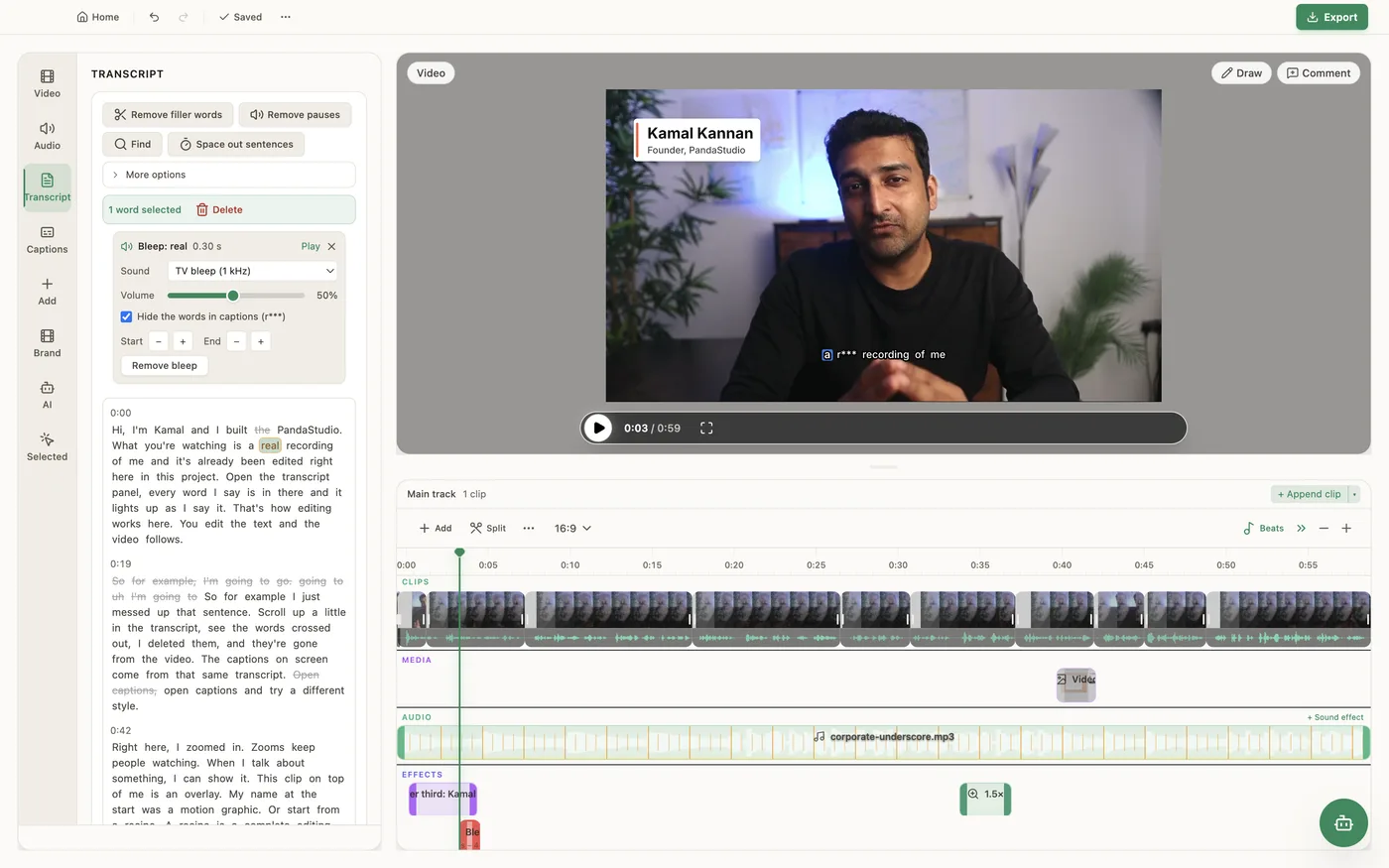
Bleeping keeps the moment in the video instead of cutting it. Select one or more words in the Transcript tab, right-click and choose Bleep word (or Bleep N words). Adjacent words become one bleep. The words' own audio is silenced and a tone of the same length plays over them, with 30 ms of padding on each side by default, and the captions show the word masked: the first letter followed by asterisks. The bleep stays on those words when you cut elsewhere. Click a bleeped word to open its controls: Sound (TV bleep (1 kHz), Low tone, High tone, Retro beep, or Silence (mute only)), Volume, Hide the words in captions, Play, Start and End buttons that move each edge earlier or later in milliseconds when a word's timing is slightly off, and Remove bleep, which brings the word's audio and caption back. The bleep is applied in the preview and the export. To silence a stretch that is not a word, such as a cough or a name said under the breath, use Mute this part from the timeline's Add menu: it silences the video's own audio for that stretch while background music and sound effects keep playing. Bleeping needs a transcript; Mute this part does not.
In the app
- 1Transcribe the video if it isn't already, then open the Transcript tab.
- 2Click a word, or shift-click to select a range, then right-click and choose Bleep word (or Bleep N words).
- 3Click the bleeped word to open its controls. Pick the Sound, set the Volume and choose whether to Hide the words in captions.
- 4If the bleep starts or ends a little off the word, use the Start and End buttons to move each edge, then click Play to check.
- 5To silence a part with no words, open Add on the timeline and choose Mute this part, then drag its edges.
Ask the AI
Open the AI chat in the editor and say any of these. The agent does the edits for you.
CLI & MCP
Every capability is a verb, reachable from the terminal or from an MCP agent (Claude Code, Cursor, Cline, Continue, Claude Desktop).
pandastudio project.add-bleep --id=$ID --wordIds='["w-1203","w-1204"]' --sound=tv
Word ids come from transcript.get. Or pass --startMs / --endMs (edited ms) for audio that isn't in the transcript. Sounds: tv, low, high, retro, silence. --mask=none keeps the word visible in captions. Returns bleepIds.
pandastudio project.update-bleep --id=$ID --bleepId=$BLEEP --nudgeStartMs=40 --volume=0.4
Positive nudgeStartMs starts it earlier; positive nudgeEndMs ends it later.
pandastudio project.remove-bleep --id=$ID --bleepId=$BLEEP
Or pass --wordIds to un-bleep only some words of a bleep.
pandastudio project.add-mute-region --id=$ID --atMs=42000 --durationMs=800
Silences only the main track for that stretch (edited ms); music and sound effects keep playing. No tone, no caption change.