Browse all docs
Cut a video to the beat of the music
PandaStudio finds the beats of a music track on your computer, shows them as markers on the timeline that images, B-roll and video overlays snap to, and can place a whole montage so each picture changes every beat, every 2 beats or every bar.
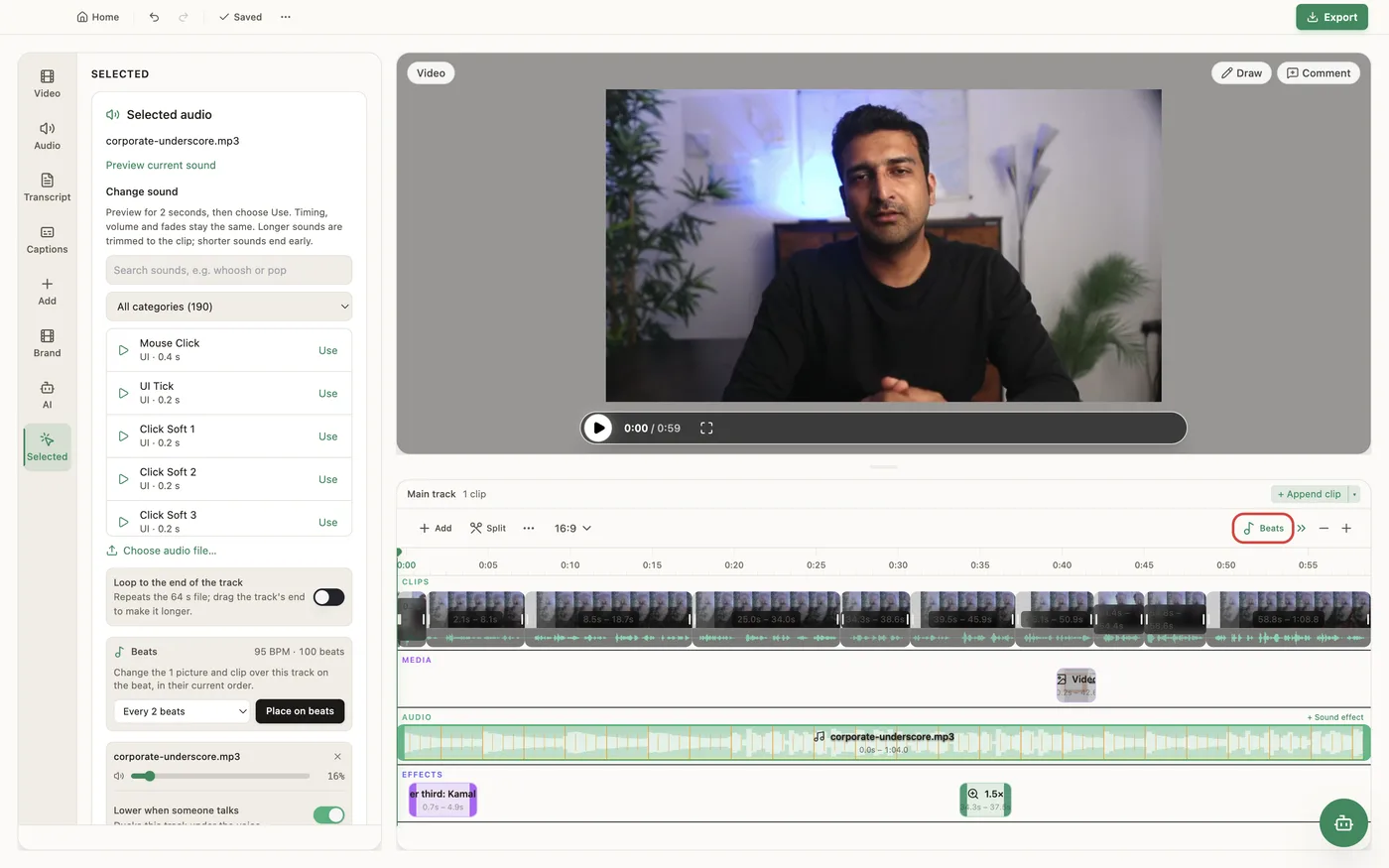
Once a music track of at least 4 seconds is on the timeline, a Beats button appears in the timeline toolbar: it shows beat markers on the music, and items you drag snap to them (hold Alt / Option to drag freely). Select the music track and the Beats panel shows its tempo in BPM and how many beats it found. With pictures or B-roll over the track, choose How often to change (Every beat, Every 2 beats or Every bar) and click Place on beats: the items are retimed in their current order so each one changes on the beat, and items that do not fit before the music ends are left as they are. The analysis runs locally, is cached per audio file, and follows the track's trim, start and loop. It works on music: narrations, sound effects and transcribed tracks are not treated as beat tracks, and speech or ambience with no steady beat reports No steady beat. Place on beats moves overlays (images, B-roll and overlay videos); it does not split the main video. To cut the main clip on a beat, use the beat markers to place the playhead and split there.
In the app
- 1Add a music track (from the Audio tab, or generate one) and add the pictures or B-roll you want over it.
- 2Click Beats in the timeline toolbar to show the beat markers. Dragged items now snap to them; hold Alt / Option to drag freely.
- 3Select the music track. The Beats panel shows the tempo and beat count.
- 4Under How often to change, pick Every beat, Every 2 beats or Every bar.
- 5Click Place on beats. The pictures and clips over the track now change on the beat, in their current order.
Ask the AI
Open the AI chat in the editor and say any of these. The agent does the edits for you.
CLI & MCP
Every capability is a verb, reachable from the terminal or from an MCP agent (Claude Code, Cursor, Cline, Continue, Claude Desktop).
pandastudio audio.detect-beats --id=$ID --regionId=audio-1
Beat times, downbeats (bar starts, 4/4 estimated), tempo and a confidence, on the edited timeline. Omit regionId for the longest music track. Confidence under 0.2 means no steady beat.
pandastudio project.place-on-beats --id=$ID --paths='["/photos/1.jpg","/photos/2.jpg","/photos/3.jpg"]' --every=1
Pass regionIds for overlays already on the timeline, or paths for new images and videos to add full-frame. every = 1, 2 (default) or 4 (every bar, starting on a downbeat). Items past the last beat come back in unplaced.