Browse all docs
Generate background music for a video with AI
PandaStudio generates original instrumental background music from a description with Google Lyria 2, run on your own Replicate account, and also includes a free music library you can use in any video, paid ads included.
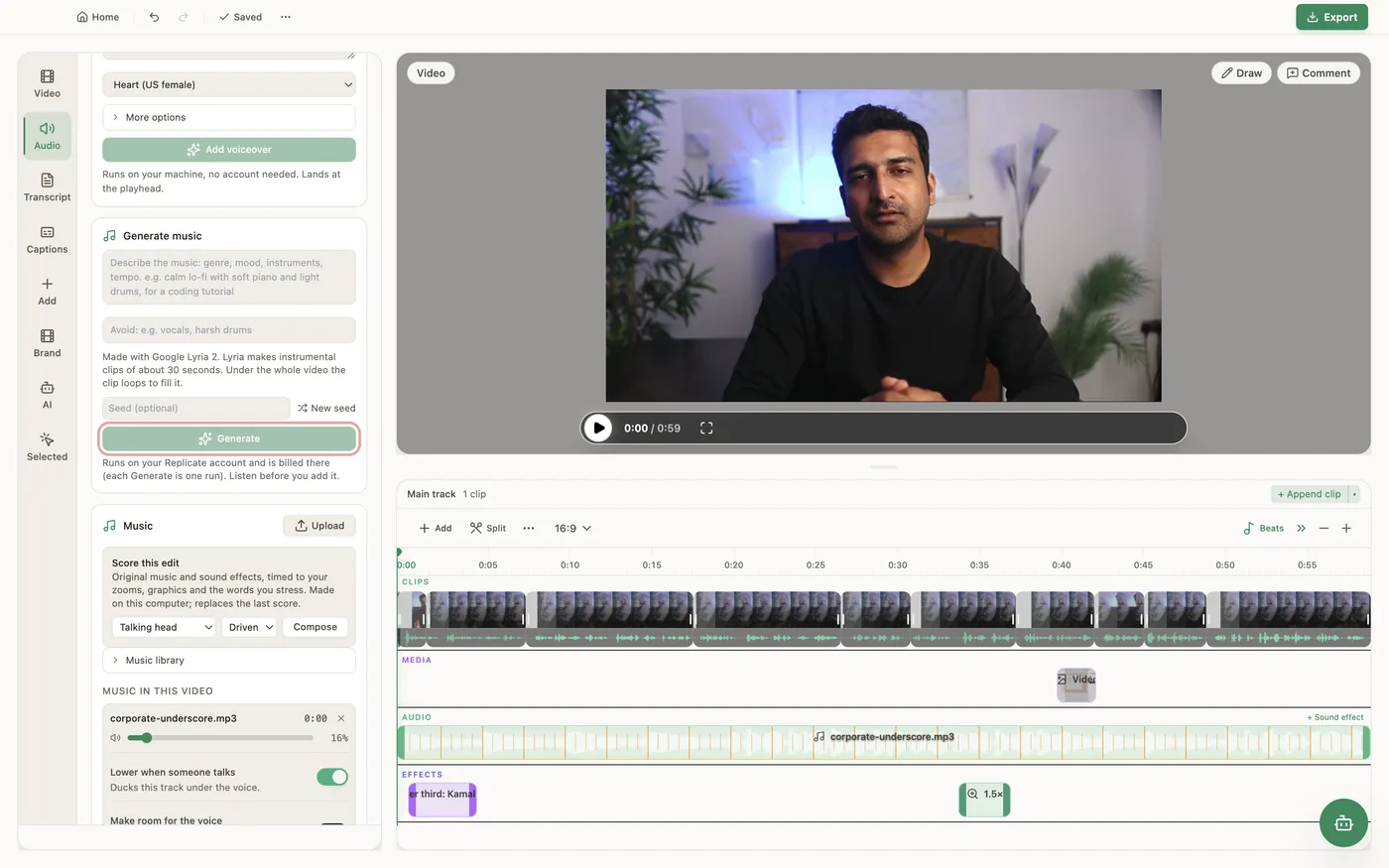
In the Audio tab, Generate music takes a description of the music (genre, mood, instruments, tempo), an optional Avoid list (for example vocals or harsh drums) and an optional Seed. Generate makes a track of about 30 seconds with Google Lyria 2 (about a minute to generate) that you can listen to before adding. Add it Under the whole video, where it loops to the end, or At the playhead, and tick Lower it under speech to duck it under the voice. Each Generate is one run billed to your Replicate account, so you need to connect Replicate first in Settings > Connectors (a sign-in, no key to copy). A generated track remembers its description: select it on the timeline and click Edit & regenerate to change it, or New seed for a different take of the same description; the new track replaces it in place with the same level, fades and ducking, and Undo brings the old one back. If you do not want to use Replicate, the Music section in the same tab has the bundled music library, free and offline. The bundled tracks are included with PandaStudio: use them in any video you make, personal or commercial, including paid ads on YouTube, Facebook, Instagram, TikTok and other platforms, with no attribution and no extra fee; they may not be resold or redistributed as standalone music. A third option, Score this edit, composes original music and sound effects on your computer timed to your zooms, graphics and the words you stress (styles Talking head, Short, Promo (no voice) and Calm tutorial; mood Driven or Bright). Generated music has no vocals and is not made to a set length.
In the app
- 1Connect Replicate once in Settings > Connectors.
- 2Open the Audio tab and find Generate music.
- 3Describe the music, optionally fill in Avoid and Seed, and click Generate. Listen to the new track.
- 4Choose Under the whole video or At the playhead, tick Lower it under speech if there is talking, and click Add to video.
- 5To change it later, select the track on the timeline and click Edit & regenerate, or New seed for a different take.
- 6Free alternative: pick a track from the Music library in the Music section, or use Score this edit to compose music and sound effects on your computer.
Ask the AI
Open the AI chat in the editor and say any of these. The agent does the edits for you.
CLI & MCP
Every capability is a verb, reachable from the terminal or from an MCP agent (Claude Code, Cursor, Cline, Continue, Claude Desktop).
pandastudio media.generate-music --prompt="calm lo-fi with soft piano, for a coding tutorial" --negativePrompt="vocals, drums"
Lyria 2 on your Replicate account (billed per run). Returns a ~30 s clip; place it with project.add-audio --loop=true and endMs at the video's length to fill a longer video.
pandastudio media.regenerate-music --id=$ID --regionId=audio-3 --newSeed=true
Replaces a generated track in place from its stored prompt. A looping bed keeps its length. Also a paid Replicate run.
pandastudio asset.list-music
The bundled library with each track's path, mood and length, plus its licence (commercial use and paid ads allowed).
pandastudio project.compose-soundtrack --id=$ID --style=talking-head --mood=major
Score this edit: composes music and sound effects on your computer from the edit's zooms, graphics and stressed words, and replaces the previous score. Run it last; --dryRun=true returns the score only.
pandastudio media.compose-soundtrack --scorePath=/path/to/score.json --name=launch-spot
Renders a score you write (sections, chords, drums, timed sound events) to a WAV on your computer; place it with project.add-audio.