Browse all docs
Get back an earlier version of your project
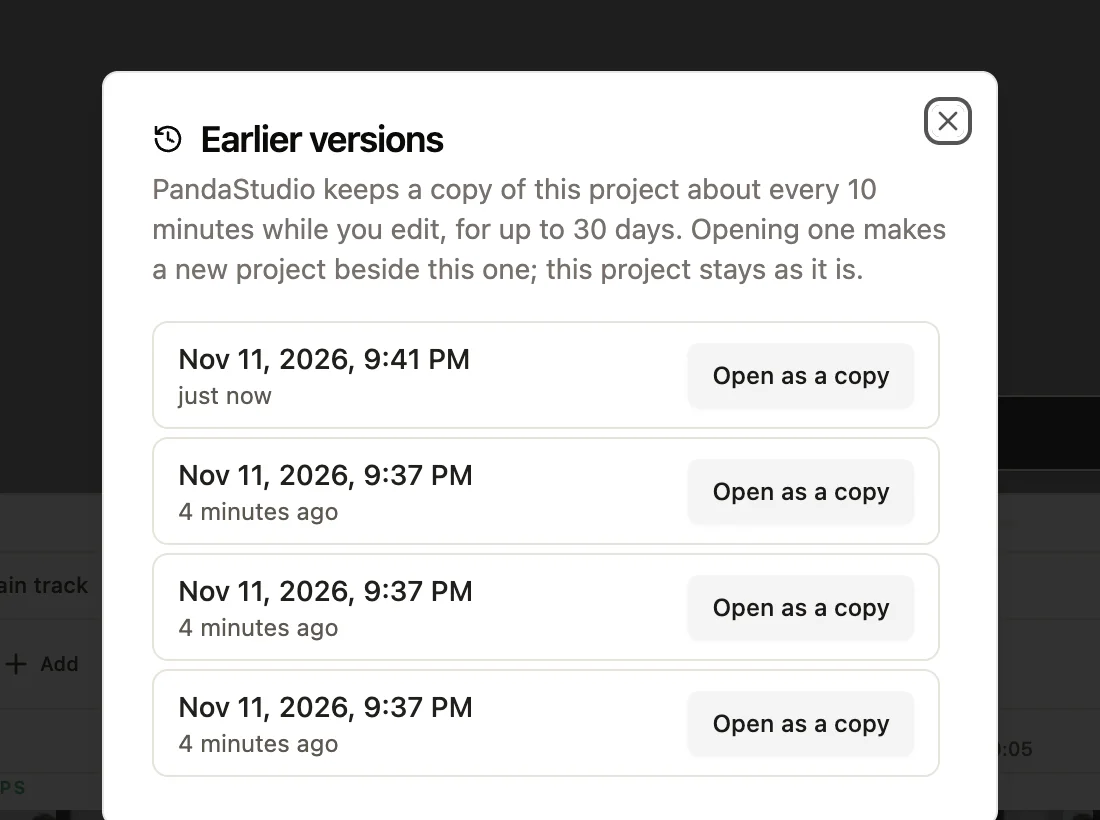
PandaStudio keeps a copy of each project about every 10 minutes while you edit, for up to 30 days. If edits go missing or a change went wrong, open an earlier version as a copy and keep whichever one you want.
Since PandaStudio 2.1.59, every project has a history of earlier versions: every one from the last 2 hours, then one per hour for 2 days, then one per day for 30 days. Earlier versions are kept on your computer, not uploaded anywhere. Opening one never changes your project: it makes a new project beside it, named with the date and time of that version, so you can compare the two and keep either. If the AI changes your project while you have edits that aren't saved yet, PandaStudio keeps your edits too: they're saved as a copy named (unsaved edits) with the time, and a notice offers to open it.
In the app
- 1Open the project in the editor.
- 2Click the ... menu at the top, then Earlier versions.
- 3Pick the time you want to go back to and click Open as a copy.
- 4PandaStudio opens that version as a new project. Your project stays as it was, next to it in Projects.
- 5If the AI changed your project while you were editing, click Open copy in the notice to get your own edits back.
Ask the AI
Open the AI chat in the editor and say any of these. The agent does the edits for you.
CLI & MCP
Every capability is a verb, reachable from the terminal or from an MCP agent (Claude Code, Cursor, Cline, Continue, Claude Desktop).
pandastudio project.versions --id=<projectId> --json
Earlier versions, newest first, with the time each was saved.
pandastudio project.open-version --id=<projectId> --versionId=<id> --json
Writes that version as a new project beside the original. The original never changes.